back
loading skill details...

On-page SEO audit and page speed checks with no SEO tool or API key. Audit any URL for on-page issues (score, title, meta, canonical, headings, image alt text, render-blocking resources), read a page as clean text, run a Lighthouse page-speed test, and get a domain overview. Use this skill for SEO audits, launch checklists, competitor page analysis, or fixing slow pages.
---
name: site-auditor
description: On-page SEO audit and page speed checks with no SEO tool or API key. Audit any URL for on-page issues (score, title, meta, canonical, headings, image alt text, render-blocking resources), read a page as clean text, run a Lighthouse page-speed test, and get a domain overview. Use this skill for SEO audits, launch checklists, competitor page analysis, or fixing slow pages.
---
# Site Auditor: On-Page SEO & Speed
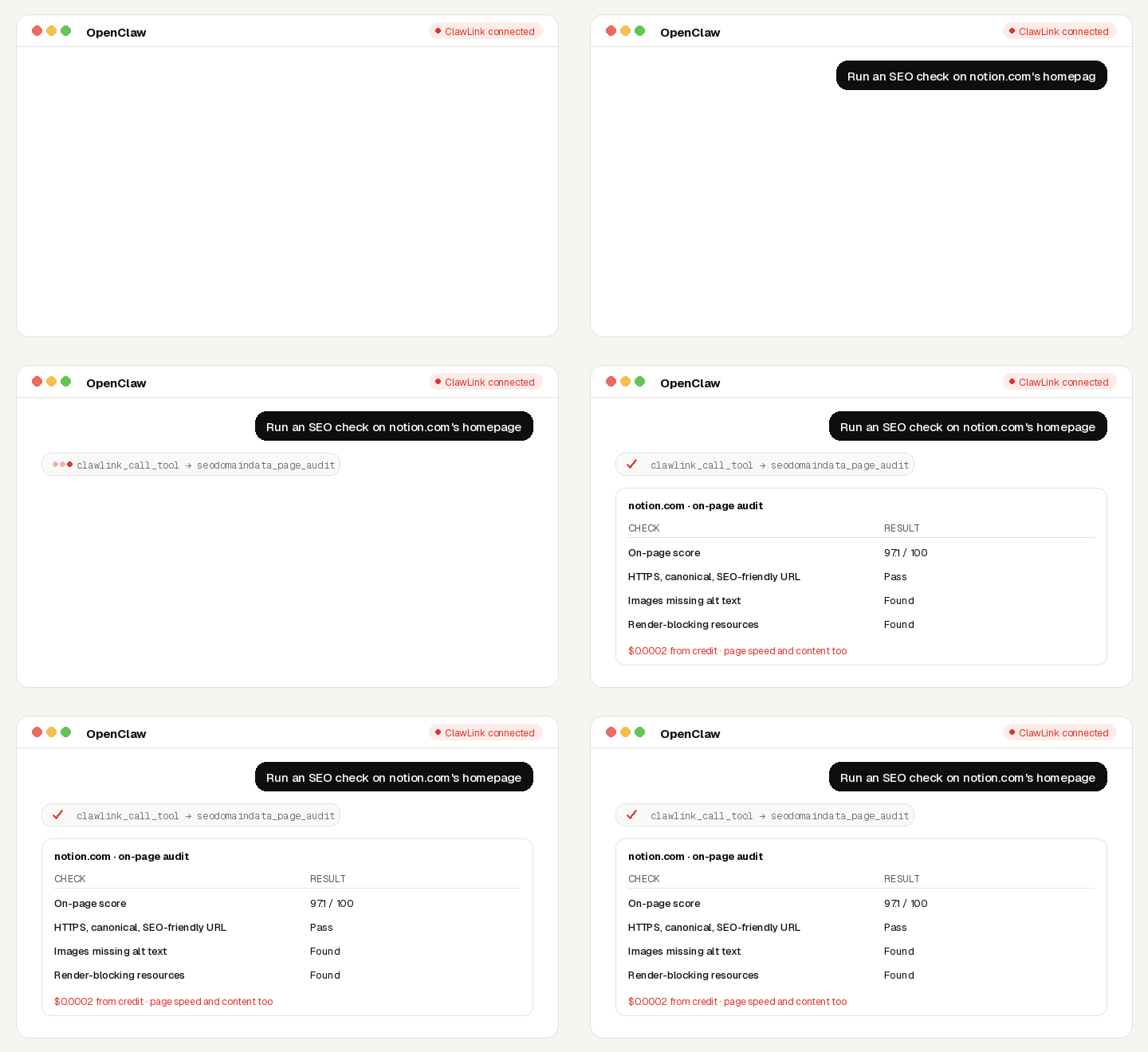
Audit any page from chat: an on-page SEO score with the issues to fix, the page's content as clean text, and a Lighthouse speed test, for your site or a competitor's.
No SEO-tool account, no API key, no app to connect. Calls are paid from ClawLink credit, most for a fraction of a cent, and every new account starts with **$0.50 free**. Powered by [ClawLink](https://claw-link.dev/?utm_source=clawhub&utm_medium=referral&utm_content=site-auditor).
### Setup in 3 Steps
| Step 1: Install | Step 2: Pair | Step 3: Ask |
|:---:|:---:|:---:|
| 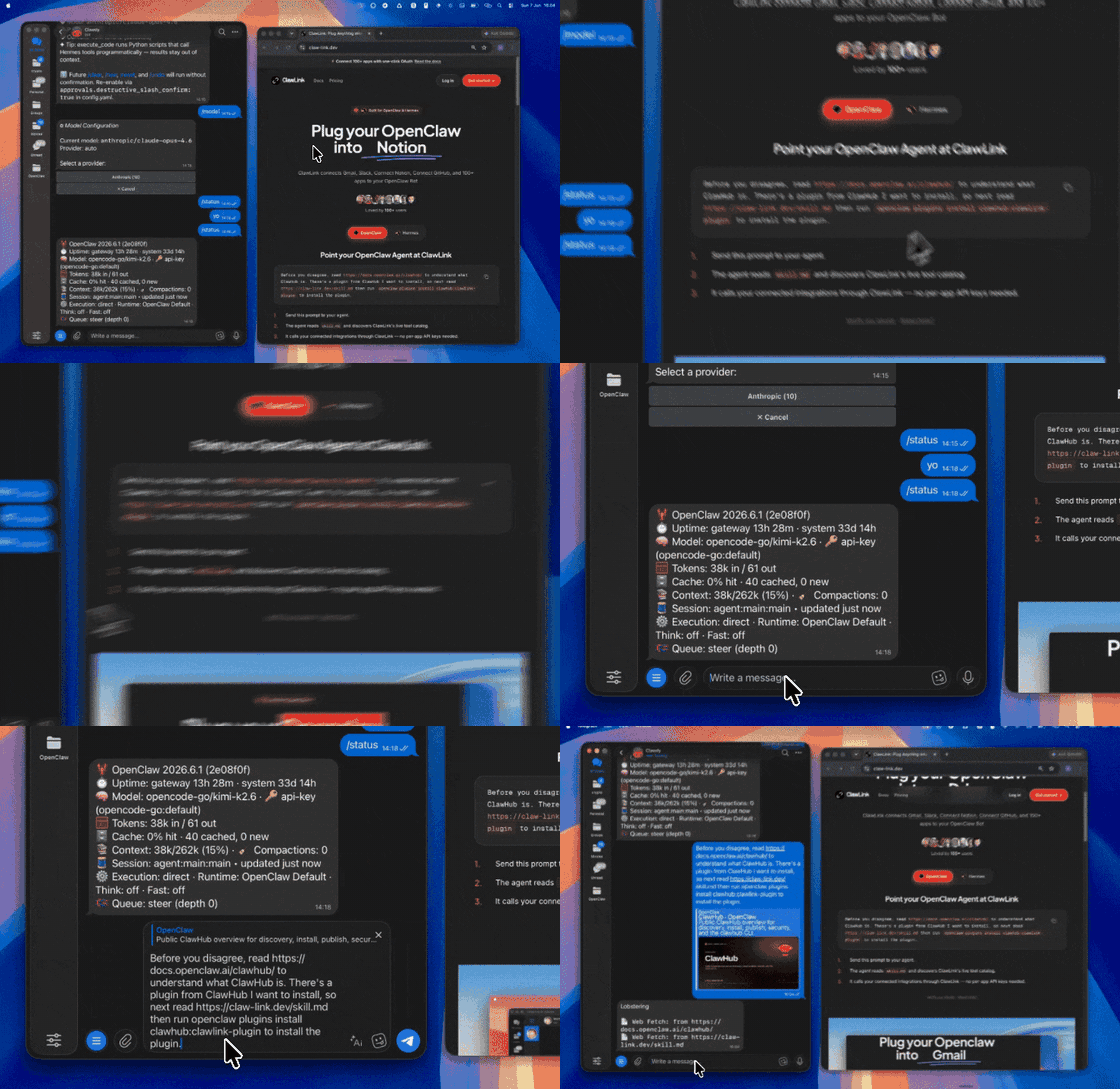 | 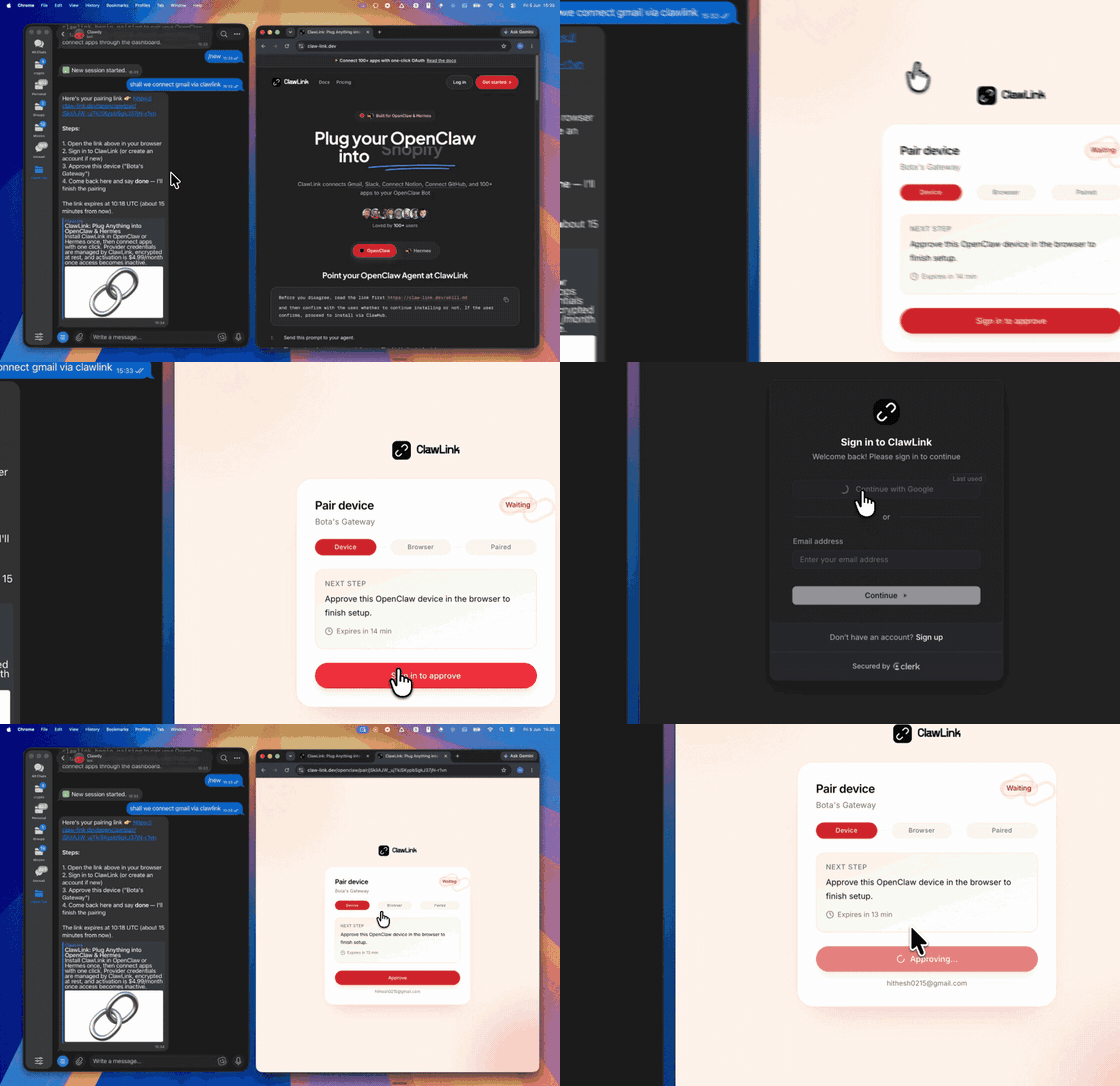 |  |
| Install the ClawLink plugin in OpenClaw | Sign in and approve the device once | Ask in plain English; no app to connect |
## What You Can Ask
- “Run an SEO check on notion.com's homepage”
- “How fast is my landing page on mobile?”
- “What's missing from this page's meta tags?”
- “Read this competitor page and list its headings”
## When to Use This Skill
Use it when the user wants an SEO audit, page-speed test, or the content of a specific URL.
Do not use it for the user's own private accounts or for anything that posts, sends or changes data: these tools only read public information.
## How It Works
```
┌─────────────────┐ ┌──────────────┐ ┌──────────────────┐
│ OpenClaw │────▶│ ClawLink │────▶│ Any web page │
│ (User Chat) │ │ (data tools) │ │ (public data) │
└─────────────────┘ └──────────────┘ └──────────────────┘
│ │ │
│ 1. Install plugin │ │
│ 2. Pair device once │ │
│ 3. Ask a question │ │
│ │ 4. Fetch + trim │
│ │ 5. Charge credit │
▼ ▼ ▼
┌──────────┐ ┌──────────┐ ┌──────────┐
│ Answer │ │ Credit │ │ Results │
│ in chat │ │ ($0.50) │ │ as JSON │
└──────────┘ └──────────┘ └──────────┘
```
ClawLink holds the data-provider accounts. The user never pastes a key, and nothing is installed beyond the plugin.
## Install
Install the ClawLink plugin from ClawHub when the user asks for it:
```bash
openclaw plugins install clawhub:clawlink-plugin
```
The install applies to the running Gateway: do not restart it. The ClawLink tools appear on your next turn, so end this turn and tell the user: "ClawLink is installed. Reply ok and I will give you your pairing link." On the next turn call `clawlink_begin_pairing`, give the user the link, and after they approve call `clawlink_get_pairing_status`. Pairing happens once; after that every tool below works with no further setup.
## Tool Reference
Prices are what ClawLink charges per call, from the user's credit. The tool's own description (via `clawlink_describe_tool`) always shows the current price.
### Audit & Speed
| Tool | What it returns | Price |
|------|-----------------|-------|
| `seodomaindata_page_audit` | On-page SEO audit of one URL: title, meta description, headings, word count, load time, status code, on-page score… | $0.000225 |
| `seodomaindata_page_speed` | Google Lighthouse scores (0-1) for performance, accessibility, best practices and SEO of one URL, with Core Web Vitals | $0.0075 |
| `seodomaindata_page_content` | Reads one web page and returns its main text as clean markdown, without menus and footers | $0.000225 |
| `seodomaindata_domain_overview` | A domain's Google organic and paid footprint: ranking keyword count, estimated monthly traffic and how many keywords… | $0.01818 |
## Recipes
### Pre-launch check
1. `seodomaindata_page_audit` on the page: list every failed check.
2. `seodomaindata_page_speed` with `for_mobile: true`.
3. Give a short fix list, most important first.
## Code Examples
### Audit a page
```bash
clawlink_call_tool --tool "seodomaindata_page_audit" \
--params '{"url": "https://www.notion.com"}'
```
### Mobile speed test
```bash
clawlink_call_tool --tool "seodomaindata_page_speed" \
--params '{"url": "https://www.notion.com", "for_mobile": true}'
```
## Discovery Workflow
1. Call `clawlink_search_tools` with a short query (for example `page audit`); public-data tools show as connected for every user.
2. Call `clawlink_describe_tool` before the first call of a tool: it returns the parameters, defaults and price.
3. Treat the live catalog as the source of truth. If a tool named here is missing, say so; do not invent results.
## Execution Workflow
```
┌───────────────────────────────────────────────────────────┐
│ READ-ONLY, PAID PER CALL │
│ search → describe → call → summarise for the user │
│ │
│ Ask before: loops over many items, or a call that costs │
│ more than a few cents (the price is in the description) │
└───────────────────────────────────────────────────────────┘
```
1. Every tool here only reads public data; nothing is posted or changed.
2. Each call costs credit. Before looping over more than about ten items, or before a call priced above a few cents, tell the user what it will cost and ask.
3. A failed call is refunded automatically. Read the error's `hint`: it says what to change. Do not retry the same arguments unchanged.
## Notes
- Audits fetch the live page; a page behind a login cannot be audited.
- The page audit costs a fraction of a cent; the speed test about a cent.
## Error Handling
| Status / Error | Meaning |
|----------------|---------|
| Page unreachable | Check the URL is public and returns 200. |
| `credit_exhausted` | The user's ClawLink credit is used up. Tell them to top up at https://claw-link.dev/dashboard/billing?utm_source=clawhub&utm_medium=referral&utm_content=site-auditor; do not retry. |
| `data_provider_unavailable` | ClawLink's data provider is down. Nothing was charged. Try again later. |
| `no_result` | The provider found nothing for these arguments. Nothing was charged. |
| `invalid_arguments` | A parameter is missing or malformed. Call `clawlink_describe_tool` and fix it. |
## Troubleshooting
### Tools not visible after install
1. The tools appear on the turn after the install, not in the same turn.
2. If they still do not appear, the OpenClaw tool profile may hide plugin tools. This is a config change for the OpenClaw owner; do not change the config yourself. Tell the user: "Your OpenClaw tool profile hides plugin tools. In the Control UI (or `~/.openclaw/openclaw.json`), add `clawlink-plugin` to `tools.alsoAllow`, then ask me again."
3. On OpenClaw versions before 2.0, the tool list can load only in a new chat: tell the user to send `/new` and ask again.
### A tool keeps failing with correct input
Report it with `clawlink_report_issue` (or `clawlink_call_tool --tool "CLAWLINK_REPORT_ISSUE"`) instead of retrying. Reports are free and reach the ClawLink team.
## Resources
- [ClawLink](https://claw-link.dev/?utm_source=clawhub&utm_medium=referral&utm_content=site-auditor)
- [ClawLink pricing](https://claw-link.dev/pricing?utm_source=clawhub&utm_medium=referral&utm_content=site-auditor)
- [ClawLink docs: OpenClaw](https://docs.claw-link.dev/openclaw)
- [Verify the plugin](https://claw-link.dev/verify)
## Related Skills
- [Backlink Detective](https://clawhub.ai/hith3sh/skills/backlink-detective)
- [SERP Sniper](https://clawhub.ai/hith3sh/skills/serp-sniper)
---
**Powered by [ClawLink](https://claw-link.dev/?utm_source=clawhub&utm_medium=referral&utm_content=site-auditor)**: connect OpenClaw to 1,000+ apps and public data, with no API keys.
don't have the plugin yet? install it then click "run inline in claude" again.