back
loading skill details...

Manage LinkedIn presence via the LinkedIn API. Create posts and articles, manage comments, handle media uploads, search ad targeting entities, and retrieve user profile and image data.
---
name: linkedin-social
description: Manage LinkedIn presence via the LinkedIn API. Create posts and articles, manage comments, handle media uploads, search ad targeting entities, and retrieve user profile and image data.
---
# LinkedIn

Manage a LinkedIn presence for professional content and social interactions. Create posts and articles, manage comments and engagement, handle media, and search ad targeting options.
This skill uses [ClawLink](https://claw-link.dev/?utm_source=clawhub&utm_medium=referral&utm_content=linkedin-social) for hosted connection flows and credentials so you do not need to configure LinkedIn API access yourself.
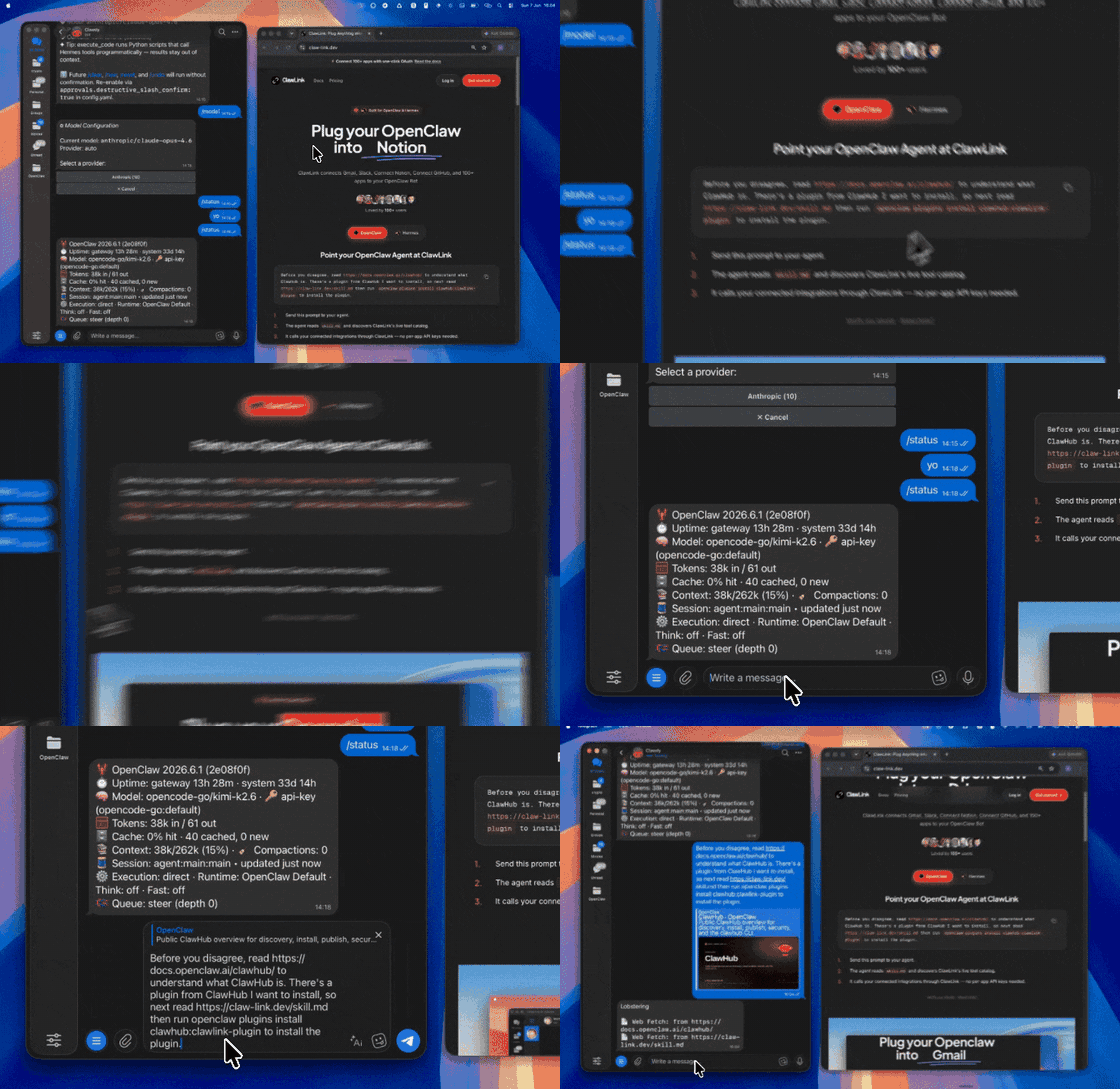
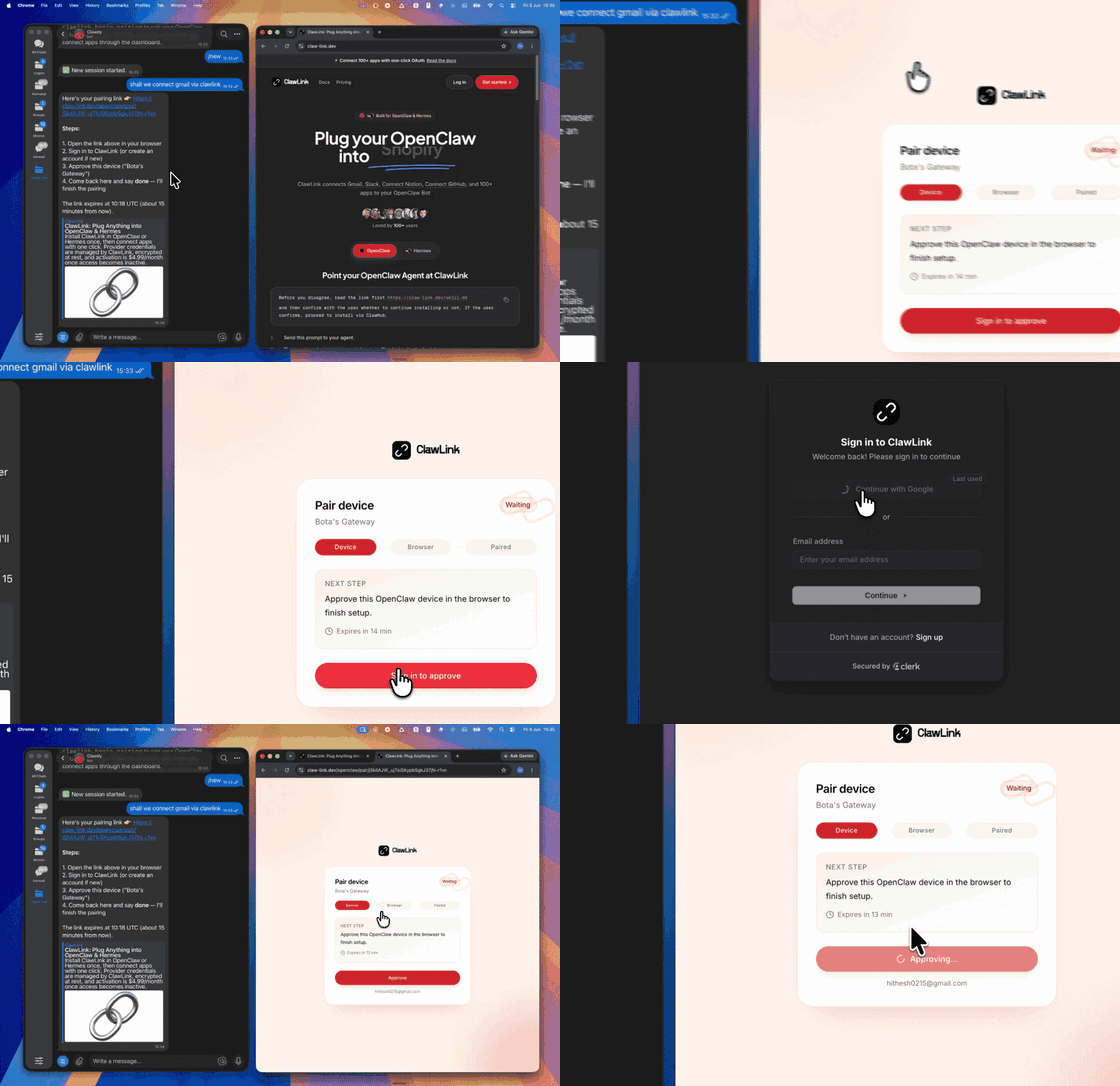
### Setup in 3 Steps
| Step 1: Install | Step 2: Pair Account | Step 3: Connect LinkedIn |
|:---:|:---:|:---:|
|  |  | *App-specific connection GIF coming soon* |
## No Account Needed: Public LinkedIn Data
Read any LinkedIn profile, company page or post, search people, companies and jobs, and browse the LinkedIn Ad Library, without connecting a LinkedIn account. These tools work as soon as the plugin is paired: there is nothing to connect, and each call is paid from ClawLink credit (most cost a fraction of a cent; new accounts get $0.50 free).
| Tool | What it returns | Price |
|------|-----------------|-------|
| `linkedindata_user_profile` | A LinkedIn member's profile by URL: name, headline, location, about, experience, education, skills and follower count | $0.0015 |
| `linkedindata_company_profile` | Public LinkedIn company page: industry, size, headquarters, follower count, description | $0.00282 |
| `linkedindata_company_posts` | Recent public posts of a LinkedIn company page | $0.00282 |
| `linkedindata_search_people` | Search LinkedIn members by name, title, company, school or location | $0.006 |
| `linkedindata_search_companies` | Search LinkedIn companies by name, location, size or industry | $0.006 |
| `linkedindata_search_jobs` | Search LinkedIn job listings by title, location, date, experience, workplace, job type and salary, 25 a page | $0.0015 |
Use the connected-account tools above for the user's own LinkedIn; use these for anyone else's public content. More: [LinkedIn Prospector](https://clawhub.ai/hith3sh/skills/linkedin-prospector), [Ad Spy](https://clawhub.ai/hith3sh/skills/ad-spy).
## How It Works
```
┌─────────────────┐ ┌──────────────┐ ┌──────────────────┐
│ OpenClaw │────▶│ ClawLink │────▶│ LinkedIn API │
│ (User Chat) │ │ (OAuth) │ │ (v2) │
└─────────────────┘ └──────────────┘ └──────────────────┘
│ │ │
│ 1. Install Plugin │ │
│ 2. Pair Device │ │
│ 3. Connect LinkedIn│ │
│ │ 4. Secure Token │
│ │ 5. Proxy Requests │
│ │ │
▼ ▼ ▼
┌──────────┐ ┌──────────┐ ┌──────────┐
│ SKILL │ │ Dashboard│ │ LinkedIn │
│ File │ │ Auth │ │ Social │
└──────────┘ └──────────┘ └──────────┘
```
## Install
Install the verified ClawLink plugin from ClawHub. After the user confirms, complete the full setup so ClawLink tools are visible in the next OpenClaw chat.
```bash
openclaw plugins install clawhub:clawlink-plugin
openclaw config set tools.alsoAllow '["clawlink-plugin"]' --strict-json
openclaw gateway restart
```
Then tell the user: "OpenClaw has been restarted. Send `/new` as a standalone message to start a fresh chat, then ask for LinkedIn again."
## Quick Start
```bash
# Get your LinkedIn profile info
clawlink_call_tool --tool "linkedin_get_my_info" --params '{}'
# Create a post
clawlink_call_tool --tool "linkedin_create_linked_in_post" --params '{"text": "Hello from OpenClaw!"}'
# Get images
clawlink_call_tool --tool "linkedin_get_images" --params '{}'
```
## Authentication
All LinkedIn tool calls are authenticated automatically by ClawLink using the user's connected LinkedIn account.
**No API key is required in chat.** ClawLink stores the OAuth token securely and injects it into every LinkedIn API request on the user's behalf.
### Getting Connected
1. Install the ClawLink plugin (see Install above).
2. Pair the plugin with `clawlink_begin_pairing` if it is not configured yet.
3. Open https://claw-link.dev/dashboard?add=linkedin and connect LinkedIn (requires a LinkedIn account).
4. Call `clawlink_list_integrations` to verify the connection is active.
## Connection Management
### List Connections
```bash
clawlink_list_integrations
```
**Response:** Returns all connected integrations. Look for `linkedin` in the list.
### Verify Connection
```bash
clawlink_list_tools --integration linkedin
```
**Response:** Returns the live tool catalog for LinkedIn.
### Reconnect
If LinkedIn tools are missing or the connection shows an error:
1. Direct the user to https://claw-link.dev/dashboard?add=linkedin
2. After they confirm, call `clawlink_list_integrations` to verify
3. Then call `clawlink_list_tools --integration linkedin`
## Security & Permissions
- Connected-account tools are scoped to the connected LinkedIn account.
- The public-data tools under "No Account Needed" read other people's public LinkedIn content (profiles, posts, comments) without any connected account. They are read-only, never post or change anything, and each call is paid from the user's ClawLink credit.
- **All write operations require explicit user confirmation.** Before executing any post, comment, or delete action, confirm the target resource and intended effect with the user.
- Destructive actions (delete post) are marked as high-impact and must be confirmed.
- Posting as an organization requires admin role (ADMINISTRATOR, DIRECT_SPONSORED_CONTENT_POSTER, or CONTENT_ADMIN).
- Ad targeting requires LinkedIn Marketing API access.
## Tool Reference
### Profile
| Tool | Description | Mode |
|------|-------------|------|
| `linkedin_get_my_info` | Get authenticated user's profile (name, headline, picture, details) | Read |
### Posts & Content
| Tool | Description | Mode |
|------|-------------|------|
| `linkedin_create_linked_in_post` | Create a new post on LinkedIn (personal or organization) | Write |
| `linkedin_create_article_or_url_share` | Share a link with optional commentary as an article | Write |
| `linkedin_delete_linked_in_post` | Delete a specific post by share_id | Write |
| `linkedin_delete_post` | Delete a post using Posts API (supports ugcPost and share URN formats) | Write |
### Comments
| Tool | Description | Mode |
|------|-------------|------|
| `linkedin_create_comment_on_post` | Create a first-level or nested comment on a post | Write |
### Media
| Tool | Description | Mode |
|------|-------------|------|
| `linkedin_get_image` | Get details of a single image by URN | Read |
| `linkedin_get_images` | Get image metadata including download URLs, status, dimensions | Read |
### Ad Targeting
| Tool | Description | Mode |
|------|-------------|------|
| `linkedin_get_ad_targeting_facets` | Get available ad targeting facets (locations, industries, job functions) | Read |
| `linkedin_search_ad_targeting_entities` | Search targeting entities (geographics, job titles, industries) | Read |
## Code Examples
### Get your profile info
```bash
clawlink_call_tool --tool "linkedin_get_my_info" \
--params '{}'
```
### Create a post
```bash
clawlink_call_tool --tool "linkedin_create_linked_in_post" \
--params '{"text": "Excited to share our latest update! What do you think?"}'
```
### Create a comment
```bash
clawlink_call_tool --tool "linkedin_create_comment_on_post" \
--params '{"author": "urn:li:person:PROFILE_ID", "message": {"text": "Great post!"}, "post_id": "POST_ID"}'
```
### Get images
```bash
clawlink_call_tool --tool "linkedin_get_images" \
--params '{}'
```
### Search ad targeting entities
```bash
clawlink_call_tool --tool "linkedin_search_ad_targeting_entities" \
--params '{"type": "location", "keywords": "San Francisco"}'
```
## Discovery Workflow
1. Call `clawlink_list_integrations` to confirm LinkedIn is connected.
2. Call `clawlink_list_tools --integration linkedin` to see the live catalog.
3. Treat the returned list as the source of truth. Do not guess or assume what tools exist.
4. If the user describes a capability but the exact tool is unclear, call `clawlink_search_tools` with a short query and integration `linkedin`.
5. If no LinkedIn tools appear, direct the user to https://claw-link.dev/dashboard?add=linkedin.
## Execution Workflow
```
┌─────────────────────────────────────────────────────────────┐
│ READ OPERATIONS (Safe) │
│ list → get → search → describe → call │
│ │
│ Example: Get profile → Get images → Show results │
└─────────────────────────────────────────────────────────────┘
│
▼
┌─────────────────────────────────────────────────────────────┐
│ WRITE OPERATIONS (Require Confirmation) │
│ list → get → describe → preview → confirm → call │
│ │
│ Example: Preview post create → User approves → Execute │
└─────────────────────────────────────────────────────────────┘
```
1. For unfamiliar tools, ambiguous requests, or any write action, call `clawlink_describe_tool` first.
2. Use the returned guidance, schema, `whenToUse`, `askBefore`, `safeDefaults`, `examples`, and `followups` to shape the call.
3. Prefer read, list, search, and get operations before writes when that reduces ambiguity.
4. For writes or anything marked as requiring confirmation, call `clawlink_preview_tool` first.
5. Execute with `clawlink_call_tool`. Pass confirmation only after the preview matches the user's intent.
6. If the tool call fails, report the real error. Do not invent results or restate the failure as a missing capability unless the live catalog supports that conclusion.
## Notes
- Posting as an organization requires `w_organization_social` scope with ADMINISTRATOR, DIRECT_SPONSORED_CONTENT_POSTER, or CONTENT_ADMIN role.
- Posting as a person requires `w_member_social` scope.
- Delete operations are idempotent — previously deleted posts return success (204).
- Ad targeting facets require LinkedIn Marketing API access.
- Image URNs are required for media retrieval operations.
## Error Handling
| Status / Error | Meaning |
|----------------|---------|
| Tool not found | The tool name does not exist in the current catalog. Verify with `clawlink_list_tools --integration linkedin`. |
| Missing connection | LinkedIn is not connected. Direct the user to https://claw-link.dev/dashboard?add=linkedin. |
| Permission error | The authenticated account lacks the required scope for this operation. |
| Post not found | The post ID does not exist or is not accessible. |
| Write rejected | User did not confirm a write action. Always confirm before executing writes. |
### Troubleshooting: Tools Not Visible
1. Check that the ClawLink plugin is installed:
```bash
openclaw plugins list
```
2. If the plugin is installed but tools are missing, tell the user to send `/new` as a standalone message to reload the catalog.
3. If a fresh chat does not help, run:
```bash
openclaw config set tools.alsoAllow '["clawlink-plugin"]' --strict-json
openclaw gateway restart
```
4. After restart, tell the user to send `/new` again and retry.
### Troubleshooting: Permission Errors
1. Confirm the LinkedIn account has the correct permissions for the operation.
2. For organization posting, verify the account has an admin role in the organization.
3. For ad targeting, verify Marketing API access is enabled.
## Resources
- [LinkedIn API Documentation](https://learn.microsoft.com/en-us/linkedin/)
- [LinkedIn Marketing API](https://learn.microsoft.com/en-us/linkedin/marketing/)
- ClawLink: https://claw-link.dev/?utm_source=clawhub&utm_medium=referral&utm_content=linkedin-social
- ClawLink Docs: https://docs.claw-link.dev/openclaw
- ClawLink Verification: https://claw-link.dev/verify
## Related Skills
- [LinkedIn Prospector](https://clawhub.ai/hith3sh/skills/linkedin-prospector)
- [Ad Spy](https://clawhub.ai/hith3sh/skills/ad-spy)
- [Instagram Posts](https://clawhub.ai/hith3sh/instagram-posts) — For Instagram social media management
- [Twitter](https://clawhub.ai/hith3sh/twitter) — For Twitter/X post management and analytics
- [Facebook Pages](https://clawhub.ai/hith3sh/facebook-pages) — For Facebook Page management
---
**Powered by [ClawLink](https://claw-link.dev/?utm_source=clawhub&utm_medium=referral&utm_content=linkedin-social)** — an integration hub for OpenClaw
don't have the plugin yet? install it then click "run inline in claude" again.