back
loading skill details...

Summarize daily LLM token usage per OpenClaw agent from trajectory logs, showing input, output, cache reads/writes, total, and optional billable token estima...
---
name: agent-token-usage
description: Summarize per-agent LLM token consumption for OpenClaw multi-agent setups by parsing `~/.openclaw/agents/*/sessions/<id>.jsonl` session logs (type=message, role=assistant). Ships both a CLI (Python) and an optional 📊 button injected into the Control UI header next to Search. Use when the user asks "今天哪个 agent 用了多少 token / 消耗了多少 token / token 排行 / token 统计 / how much did agent X spend today / which agent burns the most tokens / token usage breakdown / billable token estimate", or asks to install/remove the 📊 token-usage button in Control UI. Returns a ranked table with input / output / cacheRead / cacheWrite / total (and equivalent-billable token estimate). NOT for: dollar cost (use codexbar/model-usage skill), per-message inspection (use sessions_history), or non-OpenClaw runtimes.
---
# agent-token-usage 📊
Accurately attribute LLM token consumption across all OpenClaw agents for a given day.

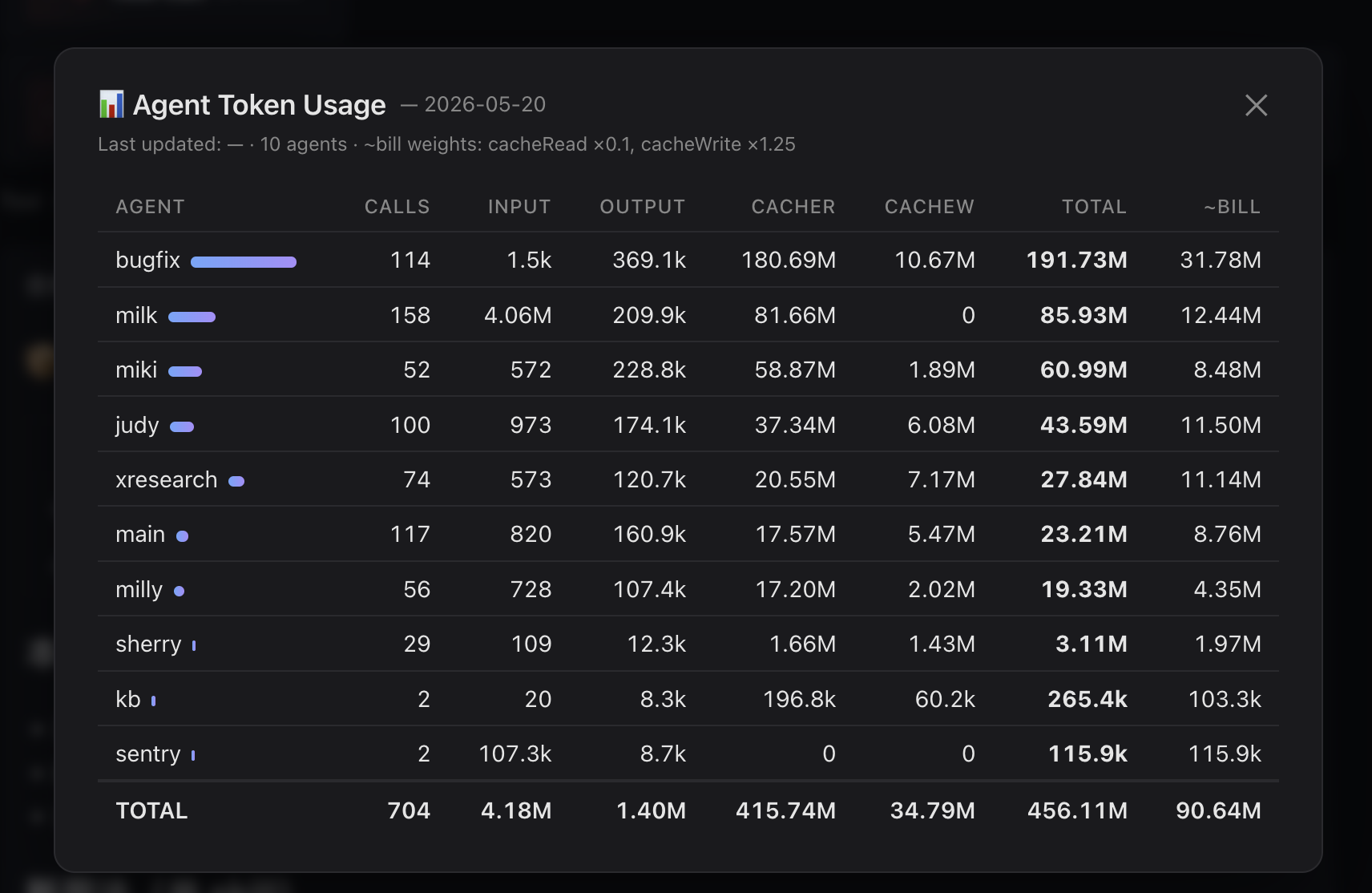
Ships two things in one skill:
1. **CLI** — `scripts/agent_token_usage.py`, always works, zero setup
2. **UI button** — optional `apply-ui.sh` injects a 📊 button into Control UI's header next to Search; clicking shows today's per-agent table in a modal
## Why this exists
`sessions_list` returns each session's `totalTokens` field which is the **last context window size**, NOT the cumulative consumption across all LLM calls in that session. For long-running sessions, real consumption can be **100×+ larger**. This skill reads the canonical session log (`<id>.jsonl`, NOT `<id>.trajectory.jsonl`) and sums every `type=="message"` / `role=="assistant"` row's `usage` object — exactly one entry per real LLM API call. This matches `pew` / openclaw's own accounting.
## Quick start (CLI)
```bash
# default = today, UTC date (matches pew / openclaw accounting)
python ~/.openclaw/workspace/skills/agent-token-usage/scripts/agent_token_usage.py
# local-tz date instead of UTC
python …/agent_token_usage.py --tz local
# specific date
python …/agent_token_usage.py --date 2026-05-20
# equivalent billable (cacheRead × 0.1 + cacheWrite × 1.25 + input + output)
python …/agent_token_usage.py --date 2026-05-20 --billable
# JSON
python …/agent_token_usage.py --format json
```
## Optional: 📊 button in Control UI
```bash
bash ~/.openclaw/workspace/skills/agent-token-usage/apply-ui.sh
```
Then refresh the Control UI tab. The button appears next to Search; clicking shows the modal.
Uninstall:
```bash
bash ~/.openclaw/workspace/skills/agent-token-usage/remove-ui.sh
```
Per-browser toggle:
```js
localStorage.setItem('milly.tokenUsageBtn', 'off')
localStorage.removeItem('milly.tokenUsageBtn')
```
### How the UI part works
```
launchd (5min) → refresh-data.sh → <ui>/data/agent-token-usage.json
│ same-origin fetch
▼
Control UI bundle (patched IIFE)
📊 button → modal table
```
CSP-friendly (`connect-src 'self'`) because data is served from the UI's own origin. No extra daemon, no extra port. After `openclaw update` overwrites `dist/control-ui/*`, just re-run `apply-ui.sh` — idempotent.
## Column semantics
| Field | Meaning | Billing weight |
|---|---|---|
| `input` | new, non-cached prompt tokens | 1.0× |
| `output` | model-generated tokens | 1.0× (typically 5× input price) |
| `cacheRead` | prompt tokens served from prompt cache | ~0.1× |
| `cacheWrite` | prompt tokens written to cache | ~1.25× |
| `total` | sum of all four (real LLM throughput) | — |
| `~bill` | weighted billable-equivalent tokens | — |
Use `total` to see "who's burning the most LLM compute"; use `~bill` to see "who's actually most expensive". High-cacheRead agents look huge but are cheap; high-input agents look small but cost more.
## How it works
1. Walk `~/.openclaw/agents/<agent>/sessions/*.jsonl` (excluding `*.trajectory.jsonl`, `*.deleted*`, `*.bak`)
2. For each line keep only records with `type=="message"` and `message.role=="assistant"`
3. Match `timestamp` against target date in chosen timezone (`--tz utc` default, `--tz local` available)
4. Sum `message.usage.{input,output,cacheRead,cacheWrite}` per agent; track sessions and models
### Why NOT trajectory.jsonl
Each LLM call produces several trajectory events (`prompt.submitted`, `context.compiled`, `model.completed`, `trace.artifacts`, …) and every one of them embeds the same `usage` snapshot. A DFS sum over trajectory inflates the real number by **~2.6×**. The canonical `<id>.jsonl` has exactly one `type=="message"` row per call — 1:1 with the API call, no de-dup needed.
## Caveats
- Only counts LLM calls (events with a `usage` object) — non-LLM tool calls excluded by design
- Cache multipliers are Anthropic ballpark numbers; adjust for other providers mentally
- Does NOT compute USD cost — use the `model-usage` skill for $ amounts
- `--date` matches ISO timestamps in session logs (UTC by default). Use `--tz local` to bucket by your local day instead
- UI auto-refresh job (launchd) is macOS only; on Linux, run `scripts/refresh-data.sh` via cron/systemd timer
## Files
| File | Purpose |
|---|---|
| `scripts/agent_token_usage.py` | CLI aggregator |
| `scripts/refresh-data.sh` | Writes JSON into every patched Control UI dist |
| `scripts/token-usage-button.iife.js` | UI patch payload (button + modal + same-origin fetch) |
| `apply-ui.sh` | Inject IIFE, cache-bust, install launchd refresh job |
| `remove-ui.sh` | Restore bundle, remove launchd job, delete data dir |
don't have the plugin yet? install it then click "run inline in claude" again.
extracted implicit decision branches (date flag, billable flag, format flag, missing fields, cross-platform refresh), documented all file paths and data formats in output contract, added edge cases (no matching events, launchd write failures, overwritten bundles, linux cron requirement), and reorganized procedure into discrete input/output steps for cli and ui workflows.
summarize per-agent llm token consumption for openclaw multi-agent setups by parsing trajectory logs. use when asked "how much token did agent X use today", "which agent burns the most tokens", "token usage breakdown", or "billable token estimate". returns a ranked table with input, output, cacheRead, cacheWrite, total tokens, and optional billable-equivalent estimate. not for dollar cost (use model-usage skill), per-message inspection (use sessions_history), or non-openclaw runtimes.
ships two delivery mechanisms: a cli (python, zero setup) and an optional 📊 button injected into control ui's header next to search.
trajectory logs record the authoritative usage object for each llm call, while sessions_list only returns the last context window size (not cumulative consumption). for long-running sessions, real token burn is 100x+ larger than sessions_list reports. this skill walks trajectory.jsonl files, sums usage objects per agent per day, and surfaces the true cost breakdown across input, output, cache reads, cache writes, and billable-equivalent tokens. use this to answer "who's actually burning compute today" and "which agent is most expensive".
required:
~/.openclaw/ with agents running sessions~/.openclaw/agents/<agent-name>/sessions/*.trajectory.jsonl in jsonl format, each line a json event with optional usage dict and ts (iso8601 timestamp)optional (for ui button):
~/.openclaw/workspace/skills/agent-token-usage/ (injected iife payload)environment / external:
invoke the aggregator script with optional flags: python ~/.openclaw/workspace/skills/agent-token-usage/scripts/agent_token_usage.py [--date YYYY-MM-DD] [--billable] [--format json|table]
walk agent trajectory files at ~/.openclaw/agents/*/sessions/*.trajectory.jsonl
for each trajectory file, read line-by-line (jsonl format)
filter events by date using ts field (iso8601 timestamp)
ts valuedfs-search each event's data field for a usage dict containing input_tokens, output_tokens, cache_read_input_tokens, cache_creation_input_tokens
accumulate token counts per agent into running totals for input, output, cacheRead, cacheWrite
compute total tokens as sum of input + output + cacheRead + cacheWrite
if --billable flag set, compute billable-equivalent tokens using formula: (cacheRead × 0.1) + (cacheWrite × 1.25) + input + output
sort agents by total tokens descending
render output as table (default) or json (if --format json)
run apply-ui.sh to inject button into control ui
launchd auto-refresh (macos only) fires every 5 minutes and runs refresh-data.sh
~/.openclaw/workspace/skills/agent-token-usage/control-ui/data/agent-token-usage.json written with latest token countsuser clicks 📊 button in control ui header
modal fetches same-origin json from ../data/agent-token-usage.json (relative to control ui origin)
modal renders table with columns: agent name, input, output, cacheRead, cacheWrite, total, ~bill (if present)
run remove-ui.sh to uninstall button and refresh job
if user provides --date flag:
if user provides --billable flag:
~bill column to output; else omit billable-equivalent tokensif user provides --format json:
if trajectory file has no usage dict in event:
if no events match target date:
if ui button already installed (apply-ui.sh run twice):
if launchd refresh job cannot write to data directory:
if control ui bundle was overwritten by openclaw update:
if running on linux:
if date string in --date does not match any trajectory timestamps:
if cacheRead, cacheWrite, or input/output tokens are missing from usage dict:
cli table format (default):
cli json format (--format json):
agent, input, output, cacheRead, cacheWrite, total, optionally billableui data file (agent-token-usage.json):
~/.openclaw/workspace/skills/agent-token-usage/control-ui/data/agent-token-usage.json (created by refresh-data.sh, served by control ui origin)timestamp (iso8601 when written), date (YYYY-MM-DD), agents (array of per-agent objects)name, input, output, cacheRead, cacheWrite, total, optionally billablecli success:
cli failure:
ui button success:
milly.tokenUsageBtn can be set to 'off' to hide button per-browser without uninstallingui button failure:
openclaw update overwrites dist, re-run apply-ui.sh and button reappears